均值平滑处理路径

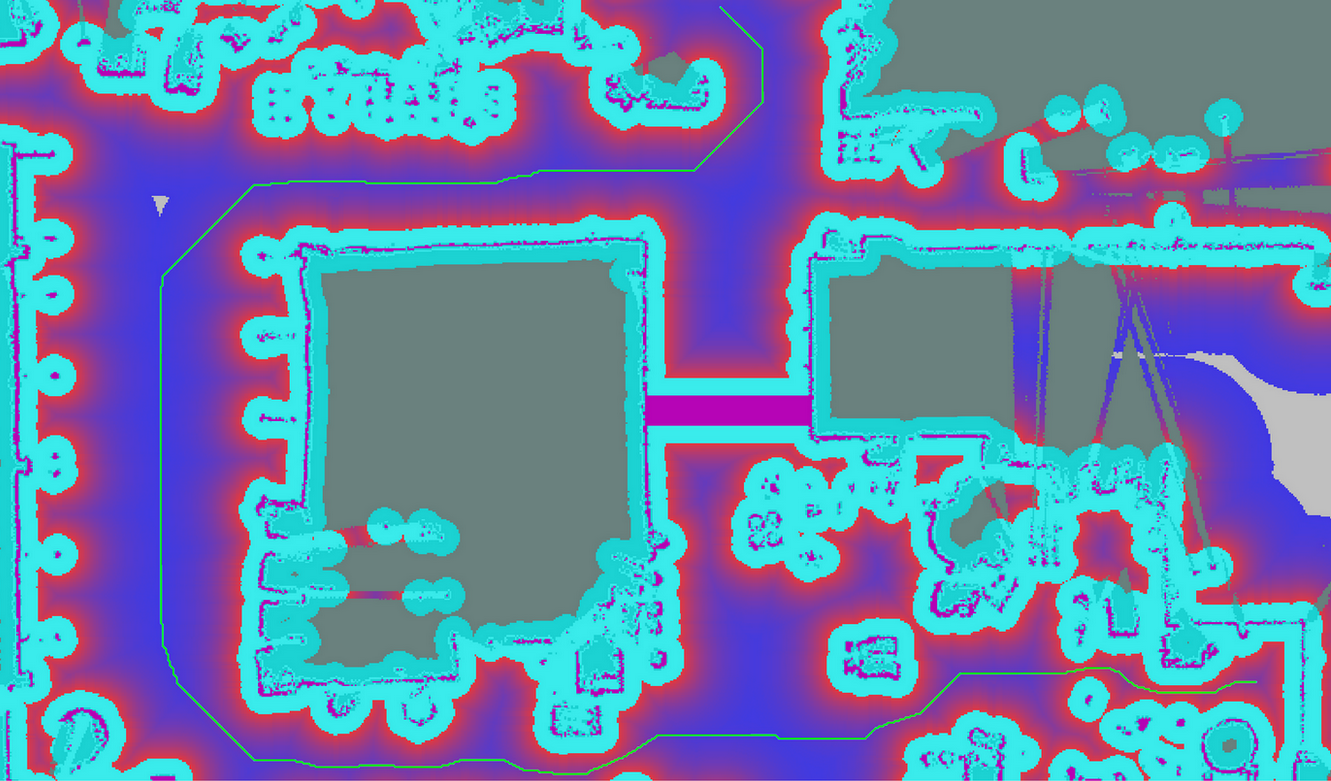
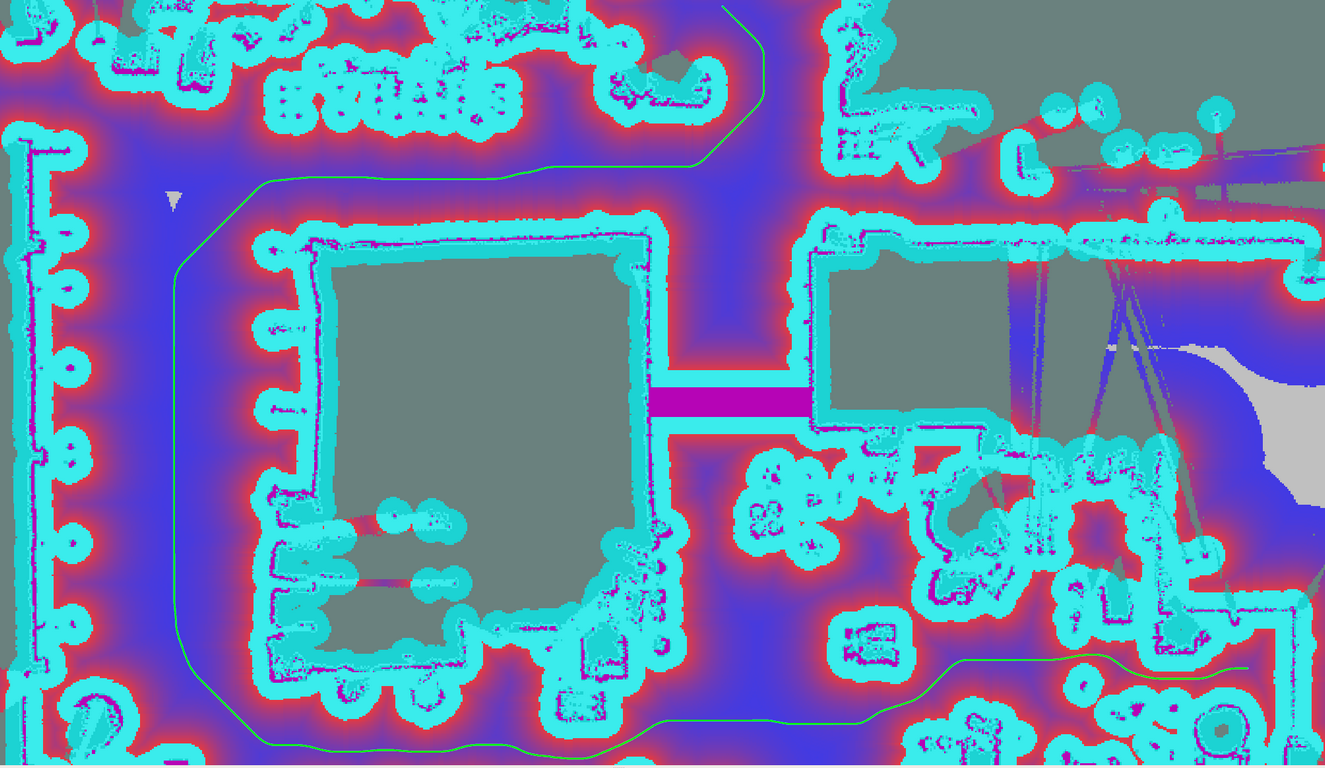
最简单的平滑算法,处理A星路径。效果如下
原始路径.png
平滑之后的路径.png


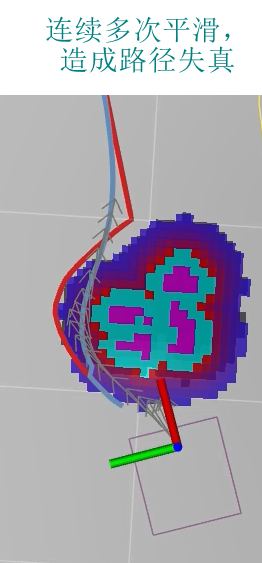
均值平滑的使用不宜太多,如图map坐标系的Y轴正向是朝左的,红色路径最左边的点,经过3次均值平滑,肯定会朝右平移,造成平滑后的路径靠近了障碍物

平均采样,获得anchor的index

1
2
3
4
5
6
7
8
9
10
11
12
13
14
15
16
17
18
19
/**
* 平均分割区间 [start, end] 为num段,num+1 个点,存入sliced
* start and end 为sliced的首尾元素
*/
template <typename T>
void uniform_slice(const T start, const T end, uint32_t num,
std::vector<T>* sliced)
{
if (!sliced || num == 0)
return;
const T delta = (end - start) / num;
sliced->resize(num + 1);
T s = start;
for (uint32_t i = 0; i < num; ++i, s += delta)
{
sliced->at(i) = s;
}
sliced->at(num) = end;
}

补充

1
2
3
4
5
6
7
8
9
10
11
12
13
14
15
16
17
18
19
20
vector<Point2D> samplePoints(const vector<Point2D>& input_points, int interval)
{
vector<Point2D> anchor_points;

int sampling_num = std::max(2, static_cast<int>(input_points.size() / interval + 0.5) );

vector<double> anchor_id;
Point2D temp_point;
uniform_slice(0, input_points.size(), sampling_num - 1, &anchor_id);

for(int i=0; i< anchor_id.size(); i++)
{
// cout << anchor_id.at(i) << " ";
temp_point = input_points.at(anchor_id.at(i) );
// cout << "anchor X: " << temp_point.first <<endl;
// cout << "anchor Y: " << temp_point.second <<endl;
anchor_points.push_back(temp_point);
}
return anchor_points;
}

1
2
3
4
5
6
7
8
9
10
11
12
13
/**
* Check if two points u and v are the same point on XY dimension.
* @param u one point that has member function x() and y().
* @param v one point that has member function x() and y().
* @return sqrt((u.x-v.x)^2 + (u.y-v.y)^2) < epsilon, i.e., the Euclid distance on XY dimension.
*/
template <typename U, typename V>
bool SamePointXY(const U& u, const V& v)
{
static constexpr double kMathEpsilonSqr = 1e-8 * 1e-8;
return (u.x() - v.x()) * (u.x() - v.x()) < kMathEpsilonSqr &&
(u.y() - v.y()) * (u.y() - v.y()) < kMathEpsilonSqr;
}
1
2
3
4
5
6
7
8
9
10
11
12
13
14
15
PathPoint GetWeightedAverageOfTwoPathPoints(const PathPoint& p1,
const PathPoint& p2,
const double w1, const double w2)
{
PathPoint p;
p.set_x(p1.x() * w1 + p2.x() * w2);
p.set_y(p1.y() * w1 + p2.y() * w2);
p.set_z(p1.z() * w1 + p2.z() * w2);
p.set_theta(p1.theta() * w1 + p2.theta() * w2);
p.set_kappa(p1.kappa() * w1 + p2.kappa() * w2);
p.set_dkappa(p1.dkappa() * w1 + p2.dkappa() * w2);
p.set_ddkappa(p1.ddkappa() * w1 + p2.ddkappa() * w2);
p.set_s(p1.s() * w1 + p2.s() * w2);
return p;
}
1
2
3
4
5
6
7
8
9
10
11
12
// Test whether two float or double numbers are equal.
template <typename T>
typename std::enable_if<!std::numeric_limits<T>::is_integer, bool>::type
IsFloatEqual(T x, T y, int ulp = 2)
{
// the machine epsilon has to be scaled to the magnitude of the values used
// and multiplied by the desired precision in ULPs (units in the last place)
return std::fabs(x - y) <
std::numeric_limits<T>::epsilon() * std::fabs(x + y) * ulp
// unless the result is subnormal
|| std::fabs(x - y) < std::numeric_limits<T>::min();
}

相机点云无法从costmap清除障碍,甚至无法生成障碍

测试的要求: 不能把地面加入costmap,但是稍高于地面的物体能加入。

不断调整 max_obstacle_height, min_obstacle_height, obstacle_range, raytrace_range 四个参数,但是costmap发现生成的障碍总是清除不掉。

换了另一个相机和雷达,发现没有这个问题. 后来发现有时甚至不能生成障碍了。

清除障碍的函数重点是ObservationBuffer::purgeStaleObservations()其中的 observation_list_,它又来自bufferCloud函数中的observation_cloud,后者又来自 global_frame_cloud

相机发布的点云是在相机坐标系,在bufferCloud函数里用pcl_ros::transformPointCloud转换到代价地图的全局坐标系(也就是yaml中指定的global_frame,一般关注的是local costmap。) 得到 global_frame_cloud。然后按如下条件筛选出 observation_cloud

1
2
3
4
5
6
7
8
for (unsigned int i = 0; i < cloud_size; ++i)
{
if (global_frame_cloud.points[i].z <= max_obstacle_height_
&& global_frame_cloud.points[i].z >= min_obstacle_height_)
{
observation_cloud.points[point_count++] = global_frame_cloud.points[i];
}
}

因此 min_obstacle_heightmax_obstacle_height是在代价地图全局坐标系下的值。

bufferCloud函数中加入代码,把observation_cloud发布出来

1
2
3
sensor_msgs::PointCloud2 observation_ros_cloud;
pcl::toROSMsg(observation_cloud, observation_ros_cloud);
observation_cloud_pub.publish( observation_ros_cloud );

在构造函数里加入
1
2
3
ros::NodeHandle n;
n.param("publish_observation_cloud", pub_observation_cloud_, false );
observation_cloud_pub = n.advertise < sensor_msgs::PointCloud2 > ("observation_cloud", 2);

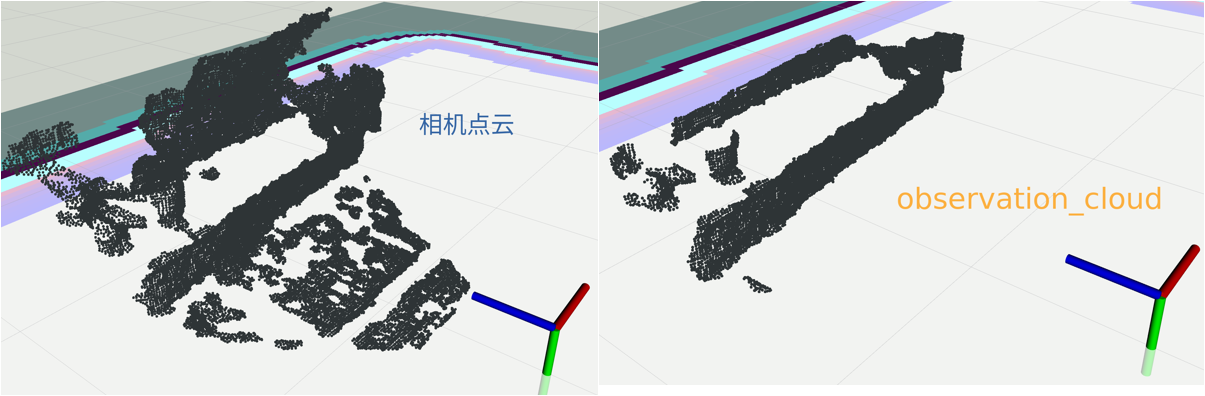
这样可以观察最终生成的障碍来自什么样的点云。比如下面两个点云的对比

最后查啊查啊,终于发现和其他相机的区别不在参数,而在于我之前修改相机驱动时的滤波,滤得太狠了。于是修改驱动,y和z方向的点云不能太少,终于可以清除成功了。

问题的根源在于滤波后的点太少而且稀疏, 导致raytrace机制不能清除障碍。 点云滤波不能直接滤到自己需要的范围,比如即使你实际需要1m的距离,驱动里也不能只给1m,竖直y方向也不能太小,体素滤波的体素不能太大,一般取0.01,这个对点云数量的影响也很大。


vector删除指定索引的元素
1
2
3
4
5
6
7
8
9
10
11
12
13
14
15
16
17
18
19
20
21
22
23
24
25
std::vector<int> v;
v.push_back(0);
v.push_back(1);
v.push_back(2);
v.push_back(3);
v.push_back(4);
v.push_back(5);
v.push_back(6);
v.push_back(7);
v.push_back(8);
v.push_back(9);

unsigned int j = 0;
int size = v.size();
for(unsigned int i=0; i< size; i++)
{
if(i%2 == 0)
{
v.erase(v.begin() + i - j);
j++;
}
}
cout << "after remove"<< endl ;
for(unsigned int i=0; i < v.size(); i++)
cout << v[i] <<" ";

结果是 1 3 5 7 9


常见iterator自增,如果多增加,可能报错

1
2
3
4
5
6
7
8
9
10
11
12
std::vector<int> v;
v.push_back(0);
v.push_back(1);
v.push_back(2);
v.push_back(3);
v.push_back(4);

for(vector<int>::iterator it=v.begin(); it != v.end(); it++)
{
it = it + 5;
cout << *it << endl;
}

这样的程序是错的,会越界。 应该改成这样
1
2
3
4
5
6
for(vector<int>::iterator it=v.begin(); it != v.end(); it++)
{
int step = v.end() - it;
it = it+step/5;
cout << *it << endl;
}


prune_plan机制及相关问题
abstract Welcome to my blog, enter password to read.
Read more
第二次规划全局路径导致move_base退出
abstract Welcome to my blog, enter password to read.
Read more
不使用传感器时的代价地图和move_base报警

有一次机器人没有装雷达和相机,打算随便跑跑。于是在通用代价地图的障碍层,不设置传感器数据来源,运行move_base出现频繁报警

1
The /scan observation buffer has not been updated for 22.06 seconds, and it should be updated every 5.00 seconds.

来源在
1
2
3
4
5
6
7
8
9
10
11
12
13
14
bool ObservationBuffer::isCurrent() const
{
if (expected_update_rate_ == ros::Duration(0.0))
return true;
// last_updated_ 没有赋值
bool current = (ros::Time::now() - last_updated_).toSec() <= expected_update_rate_.toSec();
if (!current)
{
ROS_WARN(
"The %s observation buffer has not been updated for %.2f seconds, and it should be updated every %.2f seconds.",
topic_name_.c_str(), (ros::Time::now() - last_updated_).toSec(), expected_update_rate_.toSec());
}
return current;
}

此时发导航命令,又有报警

1
[/move_base]:Sensor data is out of date, we're not going to allow commanding of the base for safety

因为没有可靠的传感器数据,move_base不允许车跑起来。来源在MoveBase::executeCycle
1
2
3
4
5
6
if(!controller_costmap_ros_->isCurrent())
{
ROS_WARN("[%s]:Sensor data is out of date, we're not going to allow commanding of the base for safety",ros::this_node::getName().c_str());
publishZeroVelocity();
return false;
}

也就是函数
1
2
3
4
5
6
7
8
9
bool LayeredCostmap::isCurrent()
{
current_ = true;
for (vector<boost::shared_ptr<Layer> >::iterator plugin = plugins_.begin(); plugin != plugins_.end();
++plugin)
{
current_ = current_ && (*plugin)->isCurrent();
}
}

显然是因为障碍层不符合isCurrent,导致代价地图也不符合isCurrent。如果希望车照样跑,就把MoveBase::executeCycle那段注释掉,把ObservationBuffer::isCurrent()的报警也注释掉,否则没完没了。

从网上下载一个包含雷达数据的bag,又设置了通用代价地图和tf树后,发现报警依然,应该还是时间戳问题,懒得再对齐了。


ROS编程规范
  • Packages, Topics / Services, 文件、库的命名都采用 under_scored

  • Classes / Types的命名采用 CamelCased,比如class ExampleClass, class HokuyoURGLaser。 函数命名采用 camelCased,比如int exampleMethod(int example_arg)

  • 普通变量和成员变量命名、命名空间都使用 under_scored,循环中的临时变量使用i,j,k,i on the outer loop, j on the next inner loop

  • 常量命名采用 ALL_CAPITALS

  • 全局变量采用 g_ 开头的 under_scored

  • 每行最多120个字符

  • 所有头文件要包含#ifndef,比如:

1
2
3
4
#ifndef PACKAGE_PATH_FILE_H
#define PACKAGE_PATH_FILE_H
......
#endif

这部分应该在license之后,#endif在头文件的最后

  • 不使用宏

预处理所用的宏,比如

1
2
3
#if DEBUG
temporary_debugger_break();
#endif

  • 函数的输出参数使用指针,而不是引用: int exampleMethod(FooThing input, BarThing* output);

  • 头文件里不要用using namespace关键字,在源文件里可使用using,但不要using namespace std;,而是使用using std::list;, using std::vector;,否则引入了std所有内容。

  • 建议使用Exceptions,而不是returning integer error codes。 析构函数不要抛出异常。 不直接触发的回调函数,不要抛出异常。

  • 保证代码是 exception-safe: When your code can be interrupted by exceptions, you must ensure that resources you hold will be deallocated when stack variables go out of scope. In particular, mutexes must be released, and heap-allocated memory must be freed. Accomplish this safety by using the following mutex guards and smart pointers

枚举

1
2
3
4
5
6
7
8
9
10
namespace Choices
{
enum Choice
{
Choice1,
Choice2,
Choice3
};
}
typedef Choices::Choice Choice;

This prevents enums from polluting the namespace they’re inside. Individual items within the enum are referenced by: Choices::Choice1, but the typedef still allows declaration of the Choice enum without the namespace.

  • If you are using C++11 and above, you can use scoped enumeration
1
2
3
4
5
6
7
enum class Choice
{
Choice1,
Choice2,
Choice3
};
Choice c = Choice::Choice1;
  • 不建议使用全局变量和函数,尤其前者。更不能在多线程中使用。大多数变量和函数都该在类的体内,其他应当在命名空间里。

  • 类不要使用静态变量。

  • 只在 well-defined exit point 调用exit()函数

  • 使用assertions之类的比条件判断语句好,比如ROS_ASSERT, ROS_ASSERT_MSG, ROS_ASSERT_CMD, ROS_BREADK

Depending on compilation settings, the assertion may not be executed.

It is typical to develop software with assertion-checking enabled, in order to catch violations. When nearing software completion and when assertions are found to always be true in the face of extensive testing, you build with a flag that removes assertions from compilation, so they take up no space or time.

The following option to catkin_make will define the NDEBUG macro for all your ROS packages, and thereby remove assertion checks.
catkin_make -DCMAKE_CXX_FLAGS:STRING="-DNDEBUG"

Note: cmake will rebuild all your software when you run it with this command, and will remember the setting through subsequent catkin_make runs until you delete your build and devel directories and rebuild.


判断CPU 架构和操作系统类型
1
2
3
4
5
6
7
8
9
10
11
12
13
14
15
16
17
#include<iostream>

int main()
{
#if defined __linux__
std::cout<<"linux system"<<std::endl;
#elif defined _WIN32
std::cout<<"windows system"<<std::endl;
#endif

#if defined __aarch64__
std::cout<<"this is arm cpu"<<std::endl;
#elif defined __x86_64__
std::cout<<"this id x86 cpu"<<std::endl;
#endif
return 0;
}

cmake 中判断CPU 架构,操作系统类型

1
2
3
4
5
6
7
8
9
10
11
12
13
14
15
cmake_minimum_required(VERSION 3.10.0)

message(${CMAKE_HOST_SYSTEM_NAME})
message(${CMAKE_HOST_SYSTEM_PROCESSOR})

if(CMAKE_HOST_SYSTEM_NAME MATCHES "Linux")
message("this is Linux")
elseif(CMAKE_HOST_SYSTEM_NAME MATCHES "Windows")
message("this is Windows")
endif()
if(CMAKE_HOST_SYSTEM_PROCESSOR MATCHES "aarch64")
message("this is aarch64 cpu")
elseif(CMAKE_HOST_SYSTEM_PROCESSOR MATCHES "x86_64")
message("this is x86_64 cpu")
endif()

根据编译器的情况,有下面的宏用于调试程序:

1
2
3
4
5
6
7
8
9
10
11
12
13
14
15
//判断是不是C++环境,需要注意的是ROS环境中这里为否
#ifdef _cplusplus
printf("C++\n");
#endif
//判断是不是C环境
#ifdef __STDC__
printf("C\n");
#endif
//输出语句所在函数,行,文件等参数
printf("function %s: Line 25\n",__func__); //或者用__FUNCTION__
printf("pretty function %s: Line 25\n",__PRETTY_FUNCTION__); //函数声明,包括了参数
printf("line: %d\n",__LINE__);
printf("current file: %s\n",__FILE__);
printf("date: %s\n",__DATE__);
printf("time: %s\n",__TIME__);


Costmap2DROS的函数getRobotPose

源码其实并不复杂

1
2
3
4
5
6
7
8
9
10
11
12
13
14
15
16
17
18
19
20
21
22
23
24
25
26
27
28
29
30
31
32
33
34
35
36
37
bool Costmap2DROS::getRobotPose(tf::Stamped<tf::Pose>& global_pose) const
{
global_pose.setIdentity();
tf::Stamped < tf::Pose > robot_pose;
robot_pose.setIdentity();
robot_pose.frame_id_ = robot_base_frame_;
robot_pose.stamp_ = ros::Time();
ros::Time current_time = ros::Time::now(); // save time for checking tf delay later
try
{
tf_.transformPose(global_frame_, robot_pose, global_pose);
}
catch (tf::LookupException& ex)
{
ROS_ERROR_THROTTLE(1.0, "No Transform available Error looking up robot pose: %s\n", ex.what());
return false;
}
catch (tf::ConnectivityException& ex)
{
ROS_ERROR_THROTTLE(1.0, "Connectivity Error looking up robot pose: %s\n", ex.what());
return false;
}
catch (tf::ExtrapolationException& ex)
{
ROS_ERROR_THROTTLE(1.0, "Extrapolation Error looking up robot pose: %s\n", ex.what());
return false;
}
// check global_pose timeout
if (current_time.toSec() - global_pose.stamp_.toSec() > transform_tolerance_)
{
ROS_WARN_THROTTLE(1.0,
"Costmap2DROS transform timeout. Current time: %.4f, global_pose stamp: %.4f, tolerance: %.4f",
current_time.toSec(), global_pose.stamp_.toSec(), transform_tolerance_);
return false;
}
return true;
}

核心是函数 transformPosetf_在这里是tf::TransformListener,但函数实际是继承自基类tf::Transformer,有两个重载,常用的是第一个

1
2
3
4
5
6
7
8
9
10
11
void Transformer::transformPose(const std::string&   target_frame,
const Stamped< tf::Pose >& stamped_in,
Stamped< tf::Pose >& stamped_out
) const

void Transformer::transformPose(const std::string& target_frame,
const ros::Time& target_time,
const Stamped< tf::Pose >& stamped_in,
const std::string& fixed_frame,
Stamped< tf::Pose >& stamped_out
) const

第二个重载会调用函数lookupTransform
1
2
3
4
5
6
7
8
// Get the transform between two frames by frame ID assuming fixed frame.
void Transformer::lookupTransform ( const std::string & target_frame,
const ros::Time & target_time,
const std::string & source_frame,
const ros::Time & source_time,
const std::string & fixed_frame,
StampedTransform & transform
) const

  • target_frame The frame to which data should be transformed
  • target_time The time to which the data should be transformed. (0 will get the latest)
  • source_frame The frame where the data originated
  • source_time The time at which the source_frame should be evaluated. (0 will get the latest)
  • fixed_frame The frame in which to assume the transform is constant in time.
  • transform The transform reference to fill.

可能抛出的异常

1
2
3
4
5
6
7
8
namespace tf{
// Pass through exceptions from tf2
typedef tf2::TransformException TransformException;
typedef tf2::LookupException LookupException;
typedef tf2::ConnectivityException ConnectivityException;
typedef tf2::ExtrapolationException ExtrapolationException;
typedef tf2::InvalidArgumentException InvalidArgument;
}

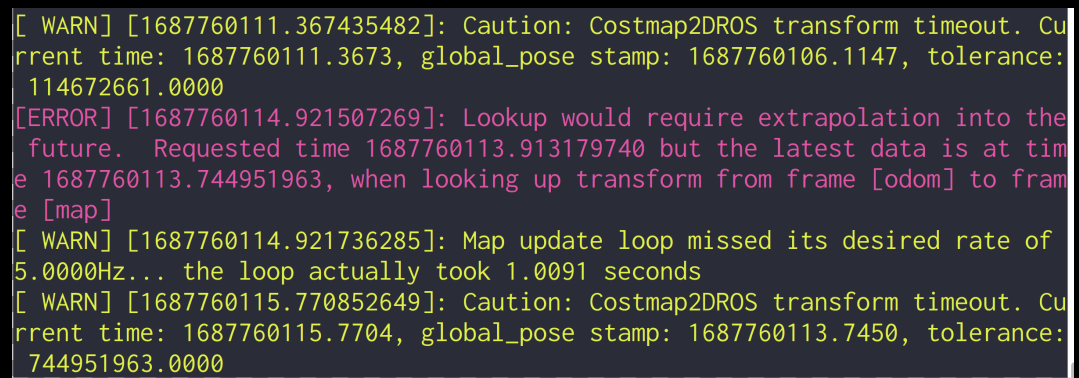
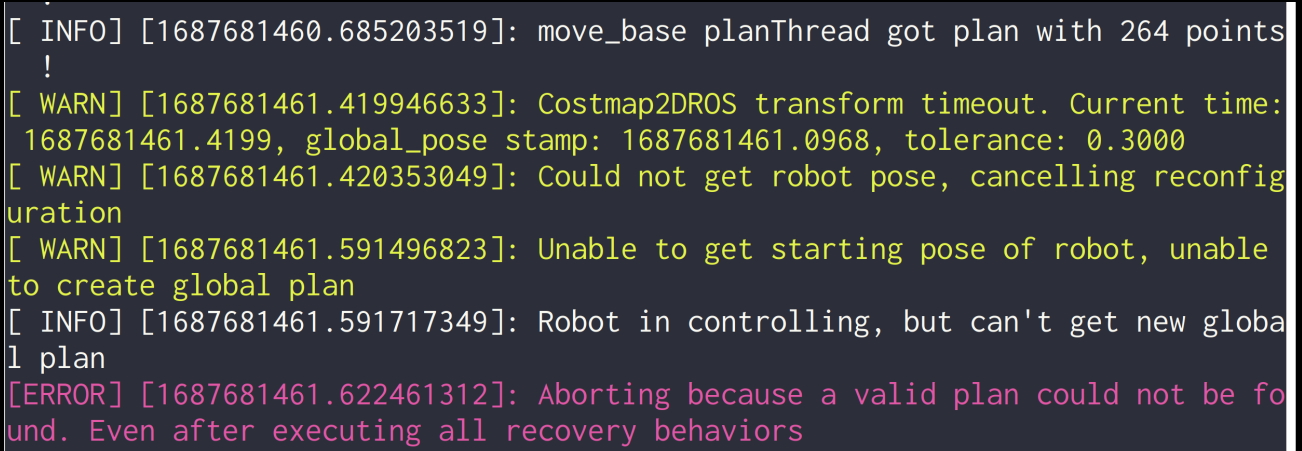
报警 Costmap2DROS transform timeout

报警对应的transform_tolerance_是在构造函数里写死的0.3,一开始我以为这个数太小了,于是改为2,结果没有改善。

以下报警的根源都是Costmap2DROS::getRobotPose

获取不到开始位姿,无法生成全局路径

尝试的改善措施(全都无效):

  • Costmap2DROS构造函数中设置: transform_tolerance_(2)
  • timer_ = private_nh.createTimer(ros::Duration(.1), &Costmap2DROS::movementCB, this); 0.1秒间隔太短了。增大到1.5,稍有改善,但未解决根本问题,反而降低了代价地图的性能。
  • 降低两个代价地图的update_frequency

所有报警基本来自Costmap2DROS::getRobotPose,或者说map—->base_link的tf变换不及时。

  1. 如果不启动VSLAM,启动诠视相机的xv_sdk.launch,使用static_transform_republisher建立假的TF树,启动导航框架,一个报警也没有。因此问题还在VSLAM,怀疑是CPU而不是网络问题。
  2. 启动诠视相机的xv_sdk.launch和VSLAM,但不发布tf,使用假的tf树,启动导航框架,仍然没有报警。
  3. 继续缩小问题范围,发布假的tf: world—->map—->odom—-> base_link,导航框架不报警。但是如果由VSLAM发布map—->odom,就有报警了。

所以问题的原因:

  1. VSLAM的map—->odom—-> base_link变换。
  2. Nano的CPU没有使用到极致,还有多余算力

在此情况下规划路径时,全局路径可生成,因为全局规划频率是0,虽然有很多报警,总能成功规划一次。但局部路径就不同了,需要频繁规划。
只看TF的频率和tf echo有没有数据还不够,应该看Rviz里,base_link坐标系在map中的坐标是否能随着机器人的移动实时更新。先满足这一点,再运行导航框架。

另一种原因是网络带宽不足

rosbag的读写

头文件

1
2
3
4
5
6
#include <rosbag/bag.h>
#include <rosbag/view.h>
#include <rosbag/message_instance.h>
#include <boost/foreach.hpp>
#define foreach BOOST_FOREACH
#include <nav_msgs/Path.h>

读写bag文件

open函数默认是读模式。

写bag文件:

1
2
3
4
5
6
7
8
9
10
rosbag::Bag bag;
try{
bag.open("/home/user/plan.bag", rosbag::bagmode::Write);
}
catch (const rosbag::BagException& ex) {
ROS_ERROR("open rosbag error: %s", ex.what() );
return;
}
bag.write("record_plan",ros::Time::now(), coverage_plan);
bag.close();

打开文件的模式有:enum rosbag::bagmode::BagMode
1
2
3
Write   
Read
Append

读bag文件一定要用trycatch

下面的例子,bag文件只有一个话题/move_base/transformed_plan,一堆nav_msgs/Path消息

1
2
3
4
5
6
7
8
9
10
11
12
13
14
15
16
17
18
19
20
21
22
23
24
25
26
27
28
29
30
rosbag::Bag bag;
try{
bag.open("/home/user/plan.bag", rosbag::bagmode::Read);
}
catch (const rosbag::BagException& ex) {
ROS_ERROR("open rosbag error: %s", ex.what() );
return;
}
std::vector<std::string> topics;
bool bag_read_once = false;

topics.push_back(std::string("record_plan") );
rosbag::View view(bag, rosbag::TopicQuery(topics) );

BOOST_FOREACH(rosbag::MessageInstance const m, view)
{
nav_msgs::Path::ConstPtr i = m.instantiate<nav_msgs::Path>();
plan_from_bag.header.frame_id = i->header.frame_id;
plan_from_bag.header.stamp = i->header.stamp;
plan_from_bag.header.seq = i->header.seq;

unsigned int path_size = i->poses.size();
ROS_INFO("plan from bag size: %zu",i->poses.size() );
plan_from_bag.poses.reserve(path_size);
if(bag_read_once) break;

plan_from_bag.poses = i->poses;
bag_read_once = true;
}
bag.close();

注意读的时候,topics容器的元素必须还是number,与写文件时一致。如果不一致,读文件会不执行foreach

用到的类如下:

1
2
3
4
5
6
7
8
9
10
11
12
13
14
15
16
17
18
19
20
21
/* Create a view and add a query
* param bag The bag file on which to run this query
* param query The actual query to evaluate which connections to include
* param start_time The beginning of the time range for the query
* param end_time The end of the time range for the query
* param reduce_overlap If multiple views return the same messages, reduce them to a single message
*/
View(Bag const& bag, boost::function<bool(ConnectionInfo const*)> query,
ros::Time const& start_time = ros::TIME_MIN, ros::Time const& end_time = ros::TIME_MAX, bool const& reduce_overlap = false);

class ROSBAG_DECL TopicQuery
{
public:
TopicQuery(std::string const& topic);
TopicQuery(std::vector<std::string> const& topics);

bool operator()(ConnectionInfo const*) const;

private:
std::vector<std::string> topics_;
};

rosbag::View的常用函数

  • iterator begin() Simply copy the merge_queue state into the iterator.
  • iterator end() Default constructed iterator signifies end.
  • ros::Time getBeginTime()
  • ros::Time getEndTime()
  • uint32_t size () 获得bag文件中所含消息的个数,不是文件大小


其他常用函数

1
2
3
4
5
6
7
// Get the filename of the bag
std::string getFileName () const

// Get the current size of the bag file (a lower bound) More...
uint64_t getSize () const

bool isOpen () const

问题

bag文件 unindexed


这种情况下如果没有用trycatch就会出错

我查来查去,没发现C++ API里有类似rosbag reindex命令的函数,只能不处理。似乎python里有,没有深入研究,

参考:
rosbag API