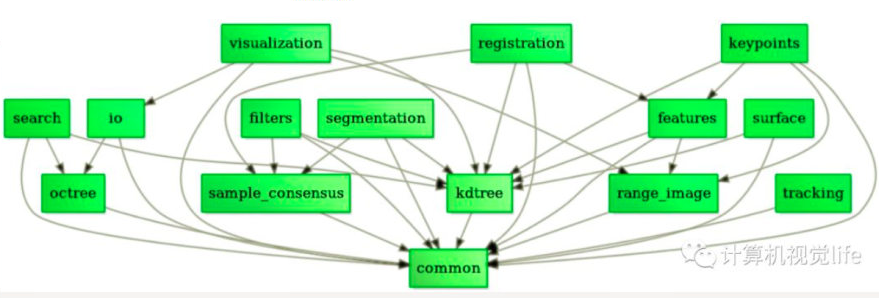
PCL包括多个子模块库。最重要的PCL模块库有如下:过滤器Filters、特征Features、关键点Keypoints、配准Registration、Kd树Kd-tree、八叉树Octree、切分Segmentation、Sample Consensus、Surface、Range Image、文件读写I/O、Visualization、通用库Common、Search
PCL中的所有模块和算法都是通过Boost共享指针来传送数据的 ,因而避免了多次复制系统中已存在的数据的需要
ROS中已经安装了pcl,不必再安装了,而且网上给的那个源一直添加失败,服务器在国外。但是ROS的pcl缺工具包,比如查看点云图片的pcl_viewer。它的安装命令是:sudo apt-get install pcl-tools
优点:
缺点:
安装 编译pcl-1.81 2 3 4 5 6 mkdir build cd buildcmake -DCMAKE_BUILD_TYPE=None -DCMAKE_INSTALL_PREFIX=/usr \ -DBUILD_GPU=ON-DBUILD_apps=ON -DBUILD_examples=ON \ -DCMAKE_INSTALL_PREFIX=/usr .. make sudo make install
sudo apt install libpcl-dev安装的pcl。那么pcl版本可能是1.12,如果vtk版本正好又是9.1,二者存在冲突会导致不能正常显示。
cmake配置 1 2 3 4 5 6 7 8 9 10 11 12 13 14 15 16 cmake_minimum_required(VERSION 2.6) project(pcl_test) find_package(PCL 1.7 REQUIRED) find_package(catkin REQUIRED COMPONENTS pcl_conversions pcl_ros ) list(REMOVE_ITEM PCL_LIBRARIES "vtkproj4" ) include_directories(${PCL_INCLUDE_DIRS} ) link_directories(${PCL_LIBRARY_DIRS} ) add_definitions(${PCL_DEFINITIONS} ) add_executable(pcl_test main.cpp) target_link_libraries (pcl_test ${PCL_LIBRARIES} )
PCL中常见的PointT类型 PointXYZ是使用最常见的一个点数据类型,因为他之包含三维XYZ坐标信息,这三个浮点数附加一个浮点数来满足存储对齐,可以通过points[i].data[0]或者points[i].x访问点X的坐标值1 2 3 4 5 6 7 8 9 10 union { float data[4 ]; struct { float x; float y; float z; }; };
PointXYZRGB也是个union,成员如下:1 2 3 4 5 6 7 8 9 10 11 12 13 14 15 union { float data[4 ]; struct { float x; float y; float z; }; }; union { struct { float rgb; }; float data_c[4 ]; };
在使用PCL库的时候,经常需要显示点云,可以用下面这段代码:1 2 3 4 5 6 7 8 9 10 11 12 13 14 15 16 17 18 19 20 21 22 23 #include <pcl/visualization/cloud_viewer.h> typedef pcl::PointXYZRGB PointT;typedef pcl::PointCloud<PointT> PointCloudT;PointCloudT::Ptr cloud (new PointCloudT) ;cloud->is_dense = false ; if (pcl::io::loadPLYFile ("file.ply" , *cloud) <0 ){ PCL_ERROR ("loading cloud failed !" ); return -1 ; } cout<< "点云共有: " << cloud->size ()<<"个点" <<endl; pcl::visualization::CloudViewer viewer ("Viewer" ) ; viewer.showCloud (cloud); while (!viewer.wasStopped ()){ }
变换点云 1 pcl::transformPointCloud (*cloud_in, *cloud_out, matrix);
cloud_in为源点云,cloud_out为变换后的点云,注意这里的matrix是4X4的欧拉矩阵,也就是第一行为R,t;第二行为0,1的矩阵
PCLVisualizer类与CloudViewer类 对于CloudViewer类来说,其方法有大致以下几类1 2 3 4 5 6 7 8 9 10 11 12 void showCloud () void wasStopped () void runOnVisualizationThread () void runOnVisualizationThreadOnce () void removeVisualizationCallable () boost::signals2::connection registerKeyboardCallback () boost::signals2::connection registerMouseCallback () boost::signals2::connection registerPointPickingCallback ()
常用代码:1 2 3 4 5 6 pcl::visualization::CloudViewer viewer ("3D Point Cloud Viewer" ) ; viewer.showCloud (m_cloud); while (!viewer.wasStopped ()){ }
如果只是简单显示点云,调用CloudViewer就可以了。PCLVisualizer更加强大,可以改变窗口背景,还可以添加球体,设置文本,功能特别丰富1 2 3 4 5 6 7 8 9 10 11 12 13 14 15 16 17 18 boost::shared_ptr<pcl::visualization::PCLVisualizer> viewer (new pcl::visualization::PCLVisualizer("3D Viewer" )) ;viewer->setBackgroundColor (0 , 0 , 0 ); int v1 (0 ) int v1 (1 ) viewer->createViewPort (0.0 , 0 , 0.5 , 1.0 , v1); viewer->createViewPort (0.5 , 0 , 1.0 , 1.0 , v2); viewer->addPointCloud<pcl::PointXYZ>(cloud, "sample cloud" ); viewer->setPointCloudRenderingProperties (pcl::visualization::PCL_VISUALIZER_POINT_SIZE, 1 , "sample cloud" ); viewer->addCoordinateSystem (1.0 ); viewer->initCameraParameters (); while (!viewer->wasStopped ()){ viewer->spinOnce (100 ); boost::this_thread::sleep (boost::posix_time::microseconds (100000 )); }
addPointCloud函数将点云添加到视窗对象中,并定义一个唯一的字符串作为ID号,利用此字符串保证在其他成员方法中也能标识引用该点云,多次调用addPointCloud(),可以实现多个点云的添加,每调用一次就创建一个新的ID号。如果想更新一个已经显示的点云,可以使用updatePointCloud函数。删除有removePointCloud(ID号)和removeAllPointClouds。 这里使用的是最简单的一个重载,此外可以在第二个参数添加PointCloudColorHandler或PointCloudColorHandler
PCLVisualizer类的键盘事件 1 2 3 4 5 6 7 8 9 10 11 12 13 14 15 16 17 18 19 20 21 22 23 bool next_iteration = false ;void keyboardEventOccurred (const pcl::visualization::KeyboardEvent& event, void * nothing) if (event.getKeySym () == "space" && event.keyDown ()){ next_iteration = true ; } } int main () pcl::visualization::PCLVisualizer *viewer; viewer = new pcl::visualization::PCLVisualizer ("PCL Windows" ); viewer->registerKeyboardCallback (&keyboardEventOccurred, (void *)NULL ); while (!viewer->wasStopped ()) { viewer->spinOnce (100 ); boost::this_thread::sleep (boost::posix_time::microseconds (100000 )); if (next_iteration) {} } return 0 ; }
其他常用函数 1 2 3 4 5 6 7 8 initCameraParameters ();setCameraPosition ( 0 , 0 , 5 , 0 , 0 , 4 , 0 , 1 , 5 );
还可以对不同的视窗添加文字和背景颜色
参考:PCL库简要说明 PCL中可用的PointT类型 PCLVisualizer PCLVisualizer可视化类