rostopic echo move_base/status
1 | rostopic pub /move_base_simple/goal geometry_msgs/PoseStamped "header: |
一句话:rostopic pub /move_base/cancel actionlib_msgs/GoalID -- {},即向话题/move_base/cancel发空消息1
2
3
4ros::Publisher cancle_pub_ = nh_.advertise("move_base/cancel",1);
actionlib_msgs::GoalID first_goal;
cancle_pub_.publish(first_goal);
1 | install(TARGETS node |
最终的可执行文件的路径在install/lib/node
另一种情况,test_node是可执行文件,test是动态库,target_link_libraries只是保证了devel/lib/test_node中的可执行文件链接了test,但不保证install/lib/test_node中链接了test,需要如下配置1
2
3
4
5
6install(
TARGETS test test_node
ARCHIVE DESTINATION ${CATKIN_PACKAGE_LIB_DESTINATION}
LIBRARY DESTINATION ${CATKIN_PACKAGE_LIB_DESTINATION}
RUNTIME DESTINATION ${CATKIN_PACKAGE_BIN_DESTINATION}
)
注意,如果修改了test对应的源文件, 需要把编译后的libtest.so也更新到远程机,否则test_node没有变化
CMAKE_INSTALL_PREFIX变量类似于configure脚本的–prefix,常见的使用方法是在build文件夹里执行cmake -DCMAKE_INSTALL_PREFIX=/usr ..
INSTALL指令用于定义安装规则,安装的内容可以包括目标二进制、动态库、静态库以及
文件、目录、脚本等。
检查CMakelist文件发现路径是include_directories("/usr/include/eigen3")
检查eigen3的路径,发现我的是/usr/local/include/eigen3/Eigen,可以链接对应的文件,即进行以下命令:1
sudo ln -s /usr/local/include/eigen3/Eigen /usr/include/Eigen
sudo ln -s 源文件 目标文件是一个常用的linux命令,功能是为源文件在目标文件的位置建立一个同步的链接,当二者建立联系后即可在源文件中访问目标文件。
链接有两种,一种被称为硬链接(Hard Link),另一种被称为符号链接(Symbolic Link). 建立硬链接时,链接文件和被链接文件必须位于同一个文件系统中,并且不能建立指向目录的硬链接。默认情况下,ln产生硬链接。如果给ln命令加上- s选项,则建立符号链接。
把所有配置放到文件g2o.cmake,然后在CMakeLists里添加1
2
3
4
5
6
7
8set(ALL_TARGET_LIBRARIES "")
include(g2o.cmake)
# 最后添加
target_link_libraries(${PROJECT_NAME}
${catkin_LIBRARIES}
${ALL_TARGET_LIBRARIES}
)
无需再添加eigen的头文件目录
我目前用的还是g2o旧版本,如果程序对应的是新版本,可能出现这样的报错1
error: ‘make_unique’ is not a member of ‘g2o’
g2o的CMakeLists.txt的OpenMP部分1
2
3
4
5
6
7
8
9
10
11
12# Eigen parallelise itself, OPENMP is experimental. We experienced some slowdown with it
set(G2O_USE_OPENMP OFF CACHE BOOL "Build g2o with OpenMP support (EXPERIMENTAL)")
if(G2O_USE_OPENMP)
find_package(OpenMP)
if(OPENMP_FOUND)
MESSAGE(" ----------------- Using OpenMP ! ----------------- ")
set (G2O_OPENMP 1)
set(g2o_C_FLAGS "${g2o_C_FLAGS} ${OpenMP_C_FLAGS}")
set(g2o_CXX_FLAGS "${g2o_CXX_FLAGS} -DEIGEN_DONT_PARALLELIZE ${OpenMP_CXX_FLAGS}")
message(STATUS "Compiling with OpenMP support")
endif(OPENMP_FOUND)
endif(G2O_USE_OPENMP)
使用OpenMP编译安装g2o,即set(G2O_USE_OPENMP ON),但是随即编译我的程序报错:1
2
3/usr/bin/ld: CMakeFiles/ls_slam_g2o.dir/src/main.cpp.o: undefined reference to symbol 'omp_set_lock@@OMP_3.0'
//usr/lib/x86_64-linux-gnu/libgomp.so.1: error adding symbols: DSO missing from command line
collect2: error: ld returned 1 exit status
搜索发现函数void lock() { omp_set_lock(&_lock); } 定义在 openmp_mutex.h
在CMakeLists.txt中添加:1
2
3
4
5
6
7
8FIND_PACKAGE(OpenMP)
target_link_libraries(node
${catkin_LIBRARIES}
${CSPARSE_LIBRARY}
${G2O_LIBS}
OpenMP::OpenMP_CXX
)
CMakeLists.txt如下1
2
3
4
5
6
7
8
9
10
11
12
13
14
15
16
17
18
19
20
21
22
23
24
25
26
27
28
29
30
31
32
33
34
35
36
37
38
39
40
41
42
43
44
45cmake_minimum_required(VERSION 2.8.3)
project(node)
add_compile_options(-std=c++11)
set(CMAKE_BUILD_TYPE "Realease")
LIST(APPEND CMAKE_MODULE_PATH ${PROJECT_SOURCE_DIR}/cmake_modules)
# find g2o lib
find_package(G2O REQUIRED)
IF(G2O_FOUND)
include_directories(${G2O_INCLUDE_DIR})
message(" -------- G2O lib is found-------- : "${G2O_INCLUDE_DIR})
ENDIF(G2O_FOUND)
find_package(Eigen3 REQUIRED)
find_package(CSparse REQUIRED)
find_package(catkin REQUIRED COMPONENTS
roscpp
rospy
std_msgs
)
# g2o的库文件也可能在 /usr/local/lib
LINK_DIRECTORIES(/opt/ros/melodic/lib)
SET(G2O_LIBS g2o_cli g2o_ext_freeglut_minimal g2o_simulator g2o_solver_slam2d_linear g2o_types_icp g2o_types_slam2d g2o_core g2o_interface g2o_solver_csparse g2o_solver_structure_only g2o_types_sba g2o_types_slam3d g2o_csparse_extension g2o_opengl_helper g2o_solver_dense g2o_stuff g2o_types_sclam2d g2o_parser g2o_solver_pcg g2o_types_data g2o_types_sim3 cxsparse )
catkin_package(
# INCLUDE_DIRS include
# LIBRARIES ls_slam
# CATKIN_DEPENDS roscpp rospy std_msgs
# DEPENDS system_lib
)
include_directories(
include
${catkin_INCLUDE_DIRS}
${EIGEN_INCLUDE_DIRS}
${CSPARSE_INCLUDE_DIR}
)
add_executable(node src/main.cpp)
target_link_libraries(node ${catkin_LIBRARIES} ${CSPARSE_LIBRARY} ${G2O_LIBS})
编译g2o结果报错fatal error: Eigen/Core: No such file or directory
compilation terminated.
FindEigen3.cmake 使用以下代码段:1
2
3
4
5
6find_path(EIGEN3_INCLUDE_DIR NAMES signature_of_eigen3_matrix_library
PATHS
${CMAKE_INSTALL_PREFIX}/include
${KDE4_INCLUDE_DIR}
PATH_SUFFIXES eigen3 eigen
)
所以它默认CMAKE_INSTALL_PREFIX在Linux主机上查找/usr/local
打开可视化工具g2o_viewer和一个示例,如果能使用,就正常了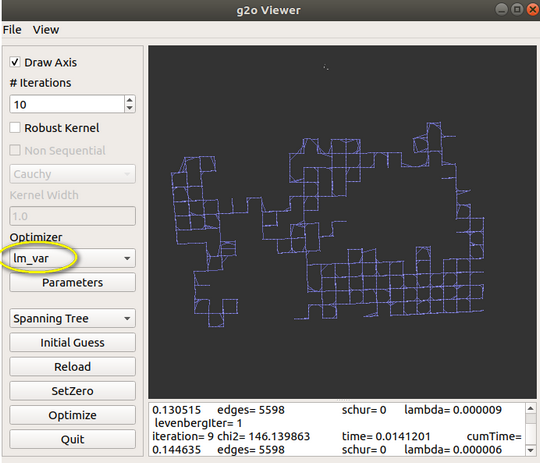
manhattan3500 dataset
1 | class OdometryHelperRos { |
这是base_local_planner局部规划器里起辅助功能的一个类,主要作用就是从/odom的topic中获取机器人的速度状态(包括线速度(x,y)和角速度z)
Costmap2DROS类有一个成员base_local_planner::OdometryHelperRos odom_helper_;,提供给用户获取当前机器人速度的接口
要使用,首先#include <base_local_planner/odometry_helper_ros.h>,
OdometryHelperRos()在初始化的时候,新建了NodeHandle并设置关注的topic的名称odom_topic;
并在回调函数odomCallback()中, 取出速度信息
类TrajectoryPlannerROS中定义: base_local_planner::OdometryHelperRos odom_helper_;
move_base的yaml中,对局部路径规划配置:teb_local_planner/TebLocalPlannerROS
MoveBase中有一段:1
2
3private_nh.param("base_local_planner", local_planner, std::string("base_local_planner/TrajectoryPlannerROS"));
tc_ = blp_loader_.createInstance(local_planner);
tc_->initialize(blp_loader_.getName(local_planner), &tf_, controller_costmap_ros_);
1 | tf::Stamped<tf::Pose> robot_vel_tf; |
1 | bool stopped(const nav_msgs::Odometry& base_odom, |
CostmapModel类继承了WorldModel,能够获取点、连线、多边形轮廓的cost,是局部规划器与costmap间的一个桥梁。初始化在move_base的构造函数,一般如下使用:1
2
3
4//costmap_2d::Costmap2DROS* planner_costmap_ros_
world_model_ = new base_local_planner::CostmapModel(*(planner_costmap_ros_ ->getCostmap()) );
std::vector<geometry_msgs::Point> footprint = planner_costmap_ros_->getRobotFootprint();
double footprint_cost = world_model_->footprintCost(x_i, y_i, theta_i, footprint);CostmapModel类帮助local planner在Costmap上进行计算, footprintCost, lineCost, pointCost三个类方法分别能通过Costmap计算出机器人足迹范围、两个cell连线、单个cell的代价,并将值返回给局部规划器。
原型1
2
3
4
5double base_local_planner::CostmapModel::footprintCost(const geometry_msgs::Point & position,
const std::vector< geometry_msgs::Point > & footprint,
double inscribed_radius,
double circumscribed_radius
)
Checks if any obstacles in the costmap lie inside a convex footprint that is rasterized into the grid.
参数:
返回值:
Positive if all the points lie outside the footprint, negative otherwise: -1 if footprint covers at least a lethal obstacle cell, or -2 if footprint covers at least a no-information cell, or -3 if footprint is [partially] outside of the map
footprintCost函数,先调用WorldModel类里面的footprintCost函数,用x,y,th把footprint_spec变成世界坐标下坐标,还得到原点在世界坐标系坐标,内切半径,外切半径。根据这些,调用CostmapModel::footprintCost函数,转换到costmap坐标系下,用光栅化算法得到栅格点,由栅格点的代价值得到足迹点线段的代价值,再得到整个足迹点集的代价值就可以了。
footprintCost函数为提高效率,它不计算足迹所有栅格的代价,认为只要计算N条边涉及到的栅格,就可计算出最大代价。首先尝试获取线段的地图坐标,然后利用lineCost函数计算线段代价值,并用footprint_cost参数保存最大的线段代价值,最终如果正常,则返回的也是footprint_cost。只要有1个线段的代价值小于0,则直接返回-1。
注意函数和栅格计算的代价值不同:返回值中,最大值是253, 即INSCRIBED_INFLATED_OBSTACLE,因为比253大的 LETHAL_OBSTACLE (254), NO_INFORMATION (255)会分别返回-1、-2,表示不可行。
返回值:
没有撞障碍时,返回值是 0
函数原型对第一个参数position的解释是:The position of the robot in world coordinates。实际是 局部代价地图的全局坐标系 ,一般是 map 或 odom
以tf::Stamped<tf::Pose>为输入类型1
2
3
4
5
6
7
8
9
10
11
12
13
14
15
16
17
18
19
20
21
22
23
24
25
26
27tf::Stamped<tf::Pose> input_pose;
input_pose.setOrigin(tf::Vector3(x, y, 0) );
input_pose.setRotation(tf::createQuaternionFromYaw(theta) );
input_pose.frame_id_ = "map";
input_pose.stamp_ = ros::Time::now();
tf::Stamped<tf::Pose> global_pose_in_local_costmap;
auto tf = context_->tf_;
try
{
tf->transformPose( local_planner_costmap_ros_->getGlobalFrameID(),
input_pose,
global_pose_in_local_costmap);
}
catch (tf::TransformException& ex)
{
ROS_INFO("Cannot transform in inCollision !");
return false;
}
double temp_x = global_pose_in_local_costmap.getOrigin().getX();
double temp_y = global_pose_in_local_costmap.getOrigin().getY();
double footprint_cost = world_model_->footprintCost(
temp_x,
temp_y,
tf::getYaw(global_pose_in_local_costmap.getRotation() ),
local_costmap_ros->getRobotFootprint() );
1 | double CostmapModel::footprintCost(const geometry_msgs::Point& position, |
搜索发现有3个lineCost函数, TrajectoryPlanner::lineCost, VoxelGridModel::lineCost, CostmapModel::lineCost。经过运行,发现调用的还是CostmapModel::lineCost
对于线段的代价计算函数lineCost,其实是对线段中的所有像素点(通过bresenham算法得到,不必深入研究)进行代价计算,如果像素点的代价为LETHAL_OBSTACLE或者NO_INFORMATION,则该点代价为-1。如果某个点的代价为-1,则该线段的代价也为-1,否则取所有点中最大的代价作为线段的代价1
2
3
4
5
6
7
8
9
10
11
12
13
14
15
16
17
18
19
20
21
22
23
24
25
26
27
28// return a positive cost for a legal line 或者负值
double CostmapModel::lineCost(int x0, int x1, int y0, int y1) const
{
double line_cost = 0.0;
double point_cost = -1.0;
for( LineIterator line( x0, y0, x1, y1 ); line.isValid(); line.advance() )
{
point_cost = pointCost( line.getX(), line.getY() );
if(point_cost < 0)
return point_cost;
if(line_cost < point_cost)
line_cost = point_cost;
}
return line_cost;
}
double CostmapModel::pointCost(int x, int y) const
{
unsigned char cost = costmap_.getCost(x, y);
//if the cell is in an obstacle the path is invalid
if(cost == NO_INFORMATION)
return -2;
if(cost == LETHAL_OBSTACLE)
return -1;
return cost;
}
参考:
CostmapModel::footprintCost
ObstacleCostFunction类,继承自Trajectory类
目前所用的机器人模型是圆形, 在通用代价地图里定义:robot_radius: 0.26, 而不是footprint参数. 但是注意TEB里用的是Point类型.
指定footprint的数组元素时, 点如果太多, 可以换行。 机器人的轮廓可能是不规则的polygon, 但它的运动中心永远是(0, 0), 顺时针和逆时针规范都支持。 这应该是局部坐标系决定的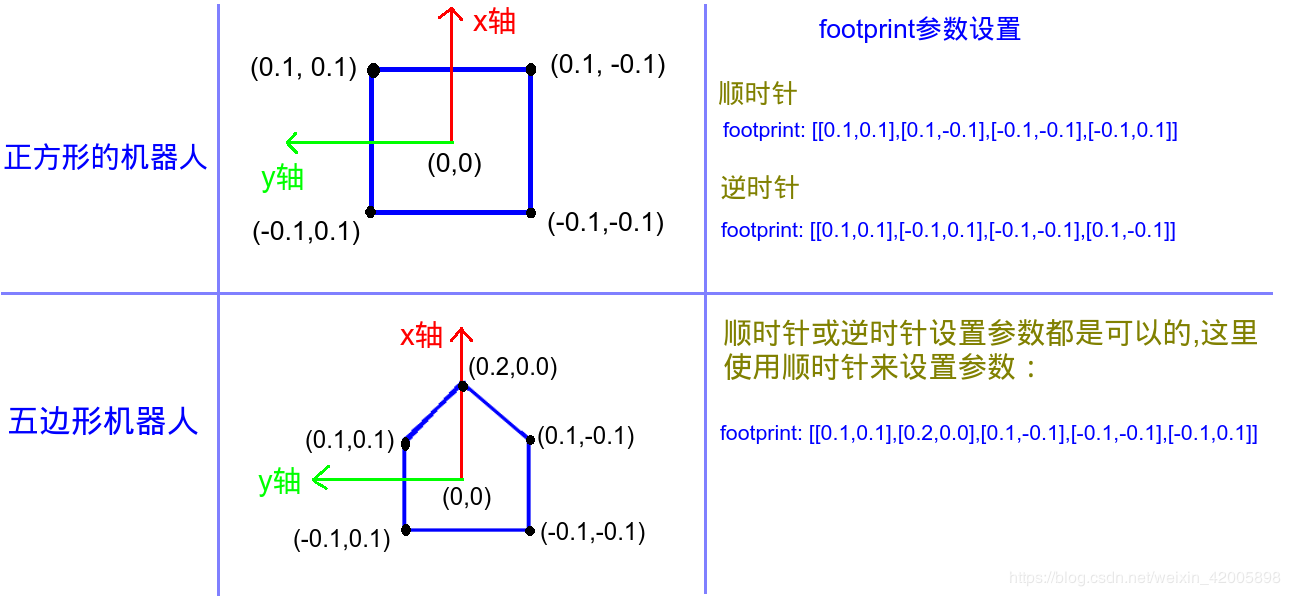
现在分析源码中对footprint参数的处理, Costmap2DROS的构造函数里有一句: setUnpaddedRobotFootprint(makeFootprintFromParams(private_nh));, 先看括号里的函数
1 | std::vector<geometry_msgs::Point> makeFootprintFromParams(ros::NodeHandle& nh) |
函数检查通用代价地图的yaml里是否定义了footprint和robot_radius参数。 前者优先, 如果footprint已经定义了, 就把它做轮廓, 不再处理robot_radius. 我目前用的是robot_radius, 所以再看makeFootprintFromRadius1
2
3
4
5
6
7
8
9
10
11
12
13
14
15
16std::vector<geometry_msgs::Point> makeFootprintFromRadius(double radius)
{
std::vector<geometry_msgs::Point> points;
// Loop over 16 angles around a circle making a point each time
int N = 16;
geometry_msgs::Point pt;
for (int i = 0; i < N; ++i)
{
double angle = i * 2 * M_PI / N;
pt.x = cos(angle) * radius;
pt.y = sin(angle) * radius;
points.push_back(pt);
}
return points;
}
这其实是把圆形处理成了一个正十六边形, 把顶点的坐标都放到容器里. 这个容器最终就是setUnpaddedRobotFootprint的参数。 打开rviz放大, 会看到它是一个十六边形。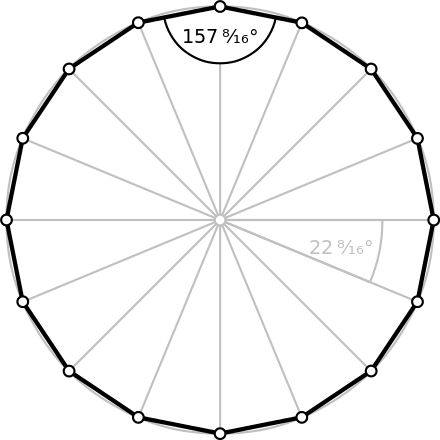
所以对于圆形轮廓机器人, 内接圆和外接圆的半径是不同的, 因为正十六边形的外接圆半径是内接圆半径的1.01959倍
1 | void Costmap2DROS::setUnpaddedRobotFootprint(const std::vector<geometry_msgs::Point>& points) |
setUnpaddedRobotFootprint主要是对padded_footprint_赋值, 和setFootprint函数
footprint_padding_只用于reconfigureCB, 可以不看. padFootprint就是处理padding的情况, 但我们的footprint_padding参数为0, 所以也不看了.
当话题上收到footprint时, 回调函数会将接收到的footprint根据参数footprint_padding_的值进行膨胀, 得到膨胀后的 padded_footprint_, 传递给各级地图。
调用了这个函数的还有setUnpaddedRobotFootprintRadius回调函数 和 setUnpaddedRobotFootprintPolygon回调函数, 前者对应footprint_radius的参数值做的话题, 后者对应footprint_topic的参数值做的话题
1 | void LayeredCostmap::setFootprint(const std::vector<geometry_msgs::Point>& footprint_spec) |
calculateMinAndMaxDistances很重要, 它可求得内外圆的半径。footprint 无论是局部代价地图还是全局代价地图得到,两个半径的计算结果都一样。 对于固定的机器人,干脆将两个半径设置为固定值,省得计算。
这里的plugin就是全局和局部代价地图里定义的plugins成员, 别忘了MoveBase里有两个代价地图, 对plugin的添加在Costmap2DROS的构造函数里.
每一层都调用了onFootprintChanged, 但是只有膨胀层覆盖了基类函数, 也就是InflationLayer::onFootprintChanged(), 这个在另一篇文章分析. 其它层没有覆盖, 还是调用的Layer类的空函数virtual void onFootprintChanged() {}
机器人轮廓之所以能在导航时也行走, 原因在updateMap1
2
3
4
5
6
7
8
9
10
11
12
13
14
15
16
17
18
19
20
21
22
23
24void Costmap2DROS::updateMap()
{
if (!stop_updates_)
{
// get pose in global frame of costmap
tf::Stamped < tf::Pose > pose;
if (getRobotPose (pose))
{
double x = pose.getOrigin().x(),
y = pose.getOrigin().y(),
yaw = tf::getYaw(pose.getRotation());
layered_costmap_->updateMap(x, y, yaw);
geometry_msgs::PolygonStamped footprint;
footprint.header.frame_id = global_frame_;
footprint.header.stamp = ros::Time::now();
transformFootprint(x, y, yaw, padded_footprint_, footprint);
footprint_pub_.publish(footprint);
initialized_ = true;
}
}
}
逻辑不复杂, padded_footprint_就是上面的十六变形的Point容器, transformFootprint是更新机器人行走时的轮廓, 原理和里程计解算类似.
footprint_pub_发布的话题就是/move_base/local_costmap/footprint
footprint, 类型geometry_msgs/Polygon, 由move_base订阅, 但没有发布者。
/move_base/global_costmap/footprint和/move_base/local_costmap/footprint话题是机器人轮廓, 可以直接获得。
Padding机制为机器人和障碍物之间提供了额外的距离, 打开rqt_reconfigure调整全局代价地图的参数footprint_padding, 膨胀层和障碍层会变化, 效果和调整参数inflation_radius和cost_scaling_factor相同。
调整局部代价地图的footprint_padding, 机器人轮廓会成比例放大和缩小。 如果确实需要改变这个参数, 两个代价地图的都要改变。
这个和padding是不同的机制, 用话题的方式在线更改机器人的轮廓, 适用于机器人更换货架而导致轮廓改变的情况。
原因在源码中的这一段, footprint_radius是自己加的, 注意全局和局部代价地图的相应话题都只发布一次
所以可以看到move_base(实际在costmap_2d) 订阅/footprint_radius 和 footprint,但没有发布者
1 | private_nh.param(topic_param, topic, std::string("footprint")); |
两个回调函数都是调用函数setUnpaddedRobotFootprint, 对于radius的情况, 也就是圆形底盘, 还是把圆按正十六边形处理。
可以用命令测试,现实中由调度端实现:1
2
3
4
5rostopic pub -1 /move_base/local_costmap/footprint_radius std_msgs/Float32 '0.34'
rostopic pub -1 /move_base/global_costmap/footprint_radius std_msgs/Float32 '0.34'
rostopic pub -1 /move_base/local_costmap/polygon_footprint geometry_msgs/Polygon '[ [-0.3, 0.3], [0.3, 0.3], [0.3, -0.3], [-0.3, -0.3] ]'
rostopic pub -1 /move_base/global_costmap/polygon_footprint geometry_msgs/Polygon '[ [-0.3, 0.3], [0.3, 0.3], [0.3, -0.3], [-0.3, -0.3] ]'
footprint是多边形, 每增加一条边, 就会增加TEB计算时间。设置和通用代价地图里相同1
2type: "polygon"
vertices: [[-0.26,0], [-0.240209, 0.099498], [-0.183848,0.240209], [0,0.26], [0.099498,0.240209], [0.5662,0.240209], [0.5662,-0.240209], [0.099498,-0.240209], [0,-0.26], [-0.183848,-0.240209], [-0.240209, -0.099498] ]
计算footprint的内切圆半径和外切圆半径, 用到点到线段的距离, 计算方法是两个向量的点积等于一个向量在另一个向量的投影乘以另一个向量的模。看函数distanceToLine
点到线段的三种情况如下:
1 | /* 作用:计算点到线段的距离 |
注意devel/lib里的so文件权限是rwxrwxr-x,install/lib里的so文件权限是rw-r--r--
节点move_base由很多库链接,一部分是/opt/ros/kinetic目录的ROS基本库文件,另一部分是/usr/lib/x86_64-linux-gnu的系统库文件,除此之外的重要库文件只有:
同理,libmove_base.so的重要链接库:
依次检查其他库文件,由于base_local_planner一般不修改,所以重要的其实就是libmove_base.so, libcostmap_2d.so, libvoxel_grid.so
主要的库文件,比较大的几个1
2
3
4
5
611M libmove_base.so
8.5M liblayers.so
3.1M libcostmap_2d.so
2.3M libteb_local_planner.so
2.0M move_base/move_base
1 | add_library( teb_local_planner |
更新teb算法的so文件,不能只更新libteb_local_planner.so,而是包含以下文件:1
libbase_local_planner.so libmove_base.so libcostmap_2d.so libvoxel_grid.so liblayers.so libteb_local_planner.so
libcostmap_2d.so:1
2
3
4
5
6
7
8
9
10
11
12
13add_library( costmap_2d
src/array_parser.cpp
src/costmap_2d.cpp
src/observation_buffer.cpp
src/layer.cpp
src/layered_costmap.cpp
src/costmap_2d_ros.cpp
src/costmap_2d_publisher.cpp
src/costmap_math.cpp
src/footprint.cpp
src/costmap_layer.cpp
)
liblayers.so:1
2
3
4
5
6
7
8add_library( layers
plugins/inflation_layer.cpp
plugins/obstacle_layer.cpp
plugins/static_layer.cpp
plugins/voxel_layer.cpp
src/observation_buffer.cpp
)

move_base运行时出错,可能是安装问题,更可能是链接问题,确保libtf.so是/opt/ros/的那个,它还会链接libtf2_ros.so 和 libtf2.so,它们也应该是/opt/ros/的
costmap中,机器人需要避开区域包括3类:
静态地图中的障碍物,适合描述整个静态场景的静止障碍物信息,如墙面、固定不动的桌柜等,对应StaticLayer,一旦在costmap中加入static_map,即使地图中的障碍物后来移走了,该区域在costmap中依然存在,机器人仍然会避开该区域。
传感器观察到的障碍物,适合描述运动的障碍物,如行人、小车、移动位置的桌椅等。通过传感器激光实时扫描到的障碍物ObstacleLayer。这一块障碍物信息是不断变化的,对于运动小车的实时避障是很有帮助的。
自定义障碍物,禁止行驶区域

二维costmap地图示例如图上所示。红色单元表示代价地图中的障碍物,蓝色单元表示由机器人内切半径来计算膨胀的障碍物,红色多边形表示机器人的垂直投影(footprint),浅灰色代表已知且未被占用的区域,深灰色代表未知区域。为了避免机器人与障碍碰撞,footprint不能与红色相交,机器人的中心不能穿过蓝色
定义了5个具体的值衡量机器人的状态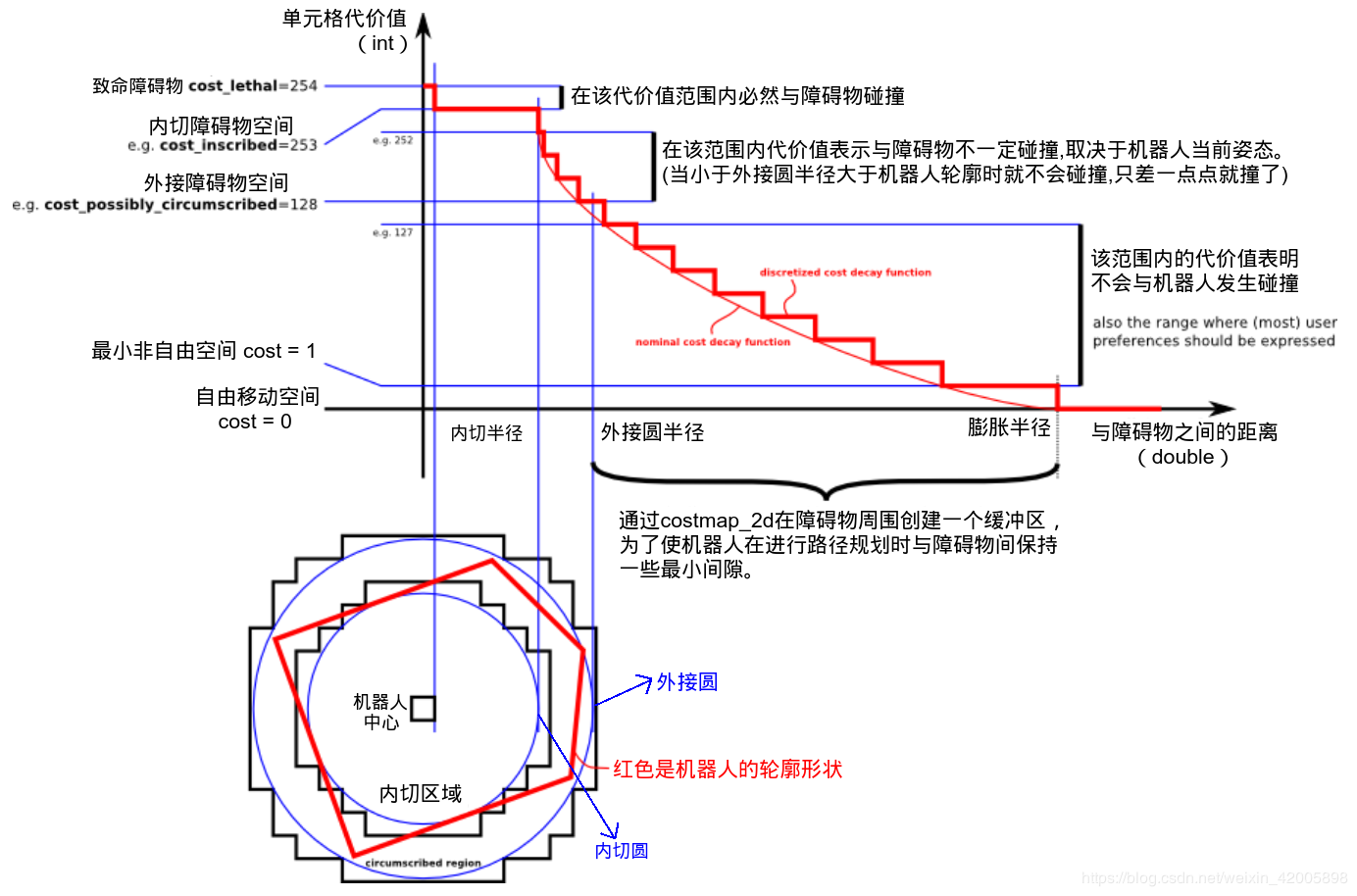
上图共分为五个部分:(下面的红色框图是机器人的轮廓,旁边的黑框是上图的映射位置)
代价地图采用网格的形式,分为三种状态:占用(有障碍物)、无用(空闲的)、未知。每个网格的值如下:1
2
3
4NO_INFORMATION = 255;
LETHAL_OBSTACLE = 254;
INSCRIBED_INFLATED_OBSTACLE = 253;
FREE_SPACE = 0;
注意252和127没有定义
cost_lethal 代价值254,机器人中心在一个cell里,这肯定发生碰撞
cost_inscribed 代价值253,机器人中心所在的cell与障碍物的距离小于机器人的内切圆半径,还是肯定碰撞,cell的代价值大于等于inscribed cost
cost_possibly_circumscribed 使用机器人的外接圆半径作为 cutoff distance. 机器人中心所在cell到障碍物距离小于机器人外切圆半径,但是大于内切圆半径。 如果机器人中心所在的cell大于等于这个值,是否碰撞要取决于机器人的朝向
possibly这个词表示不一定真是一个obstacle cell,而是用户自定义一个代价值的情况。比如,如果用户想让机器人应对避开一段特定的区域,应当向那段区域的代价地图插入自定义的代价值,而不考虑任何障碍物。
尽管128也在上图中,但真实的代价值受内切圆半径和外接圆半径的影响,对于源码在InflationLayer::computeCost:1
2
3
4
5
6
7
8
9
10
11
12
13
14
15
16
17
18
19/** @brief Given a distance, compute a cost.
* @param distance The distance from an obstacle in cells
* @return A cost value for the distance */
inline unsigned char computeCost(double distance) const
{
unsigned char cost = 0;
if (distance == 0)
cost = LETHAL_OBSTACLE;
else if (distance * resolution_ <= inscribed_radius_)
cost = INSCRIBED_INFLATED_OBSTACLE;
else
{
// make sure cost falls off by Euclidean distance
double euclidean_distance = distance * resolution_;
double factor = exp(-1.0 * weight_ * (euclidean_distance - inscribed_radius_));
cost = (unsigned char)((INSCRIBED_INFLATED_OBSTACLE - 1) * factor);
}
return cost;
}
Obstacle Map Layer:障碍层,用于动态的记录传感器感知到的障碍物信息。
Inflation Layer:膨胀层,在以上两层地图上进行膨胀(向外扩张),以避免机器人的撞上障碍物。膨胀是一个从占用cell代价值从内切障碍过渡到FREE的过程,距离cell越远代价越小,膨胀层会把障碍物代价膨胀直到该半径为止。
到实际障碍物距离dist,. 在内切圆半径到膨胀半径之间的所有cell,可以使用如下公式来计算膨胀代价:
如果cost_scaling_factor默认10,膨胀半径默认0.55,那么cost最小约为1
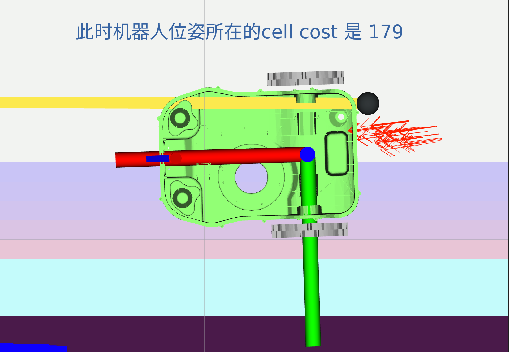
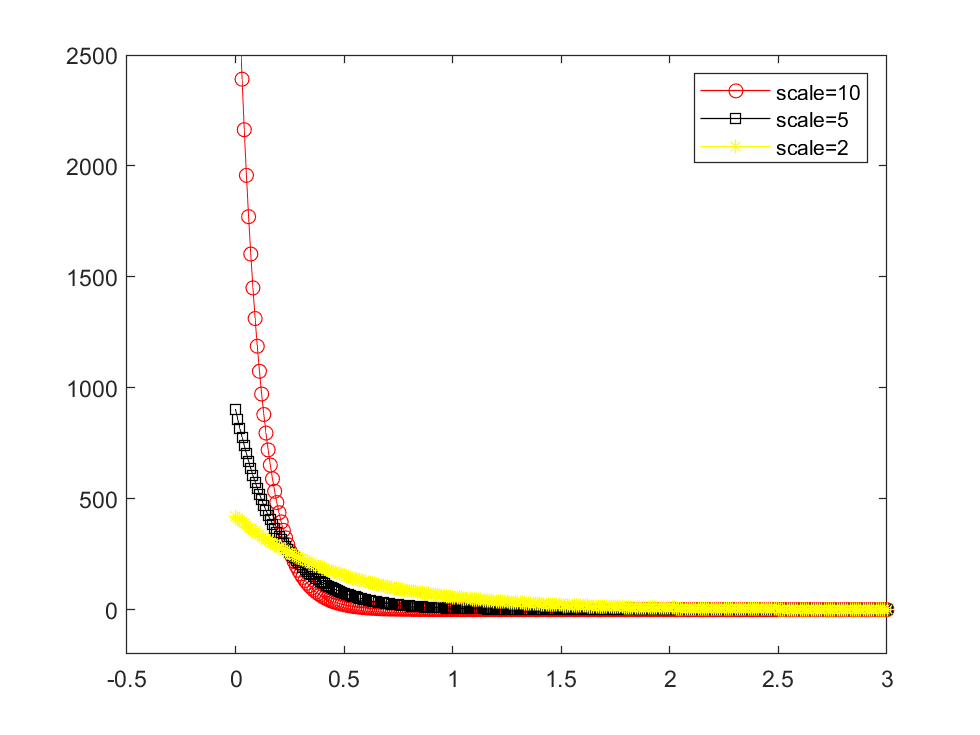
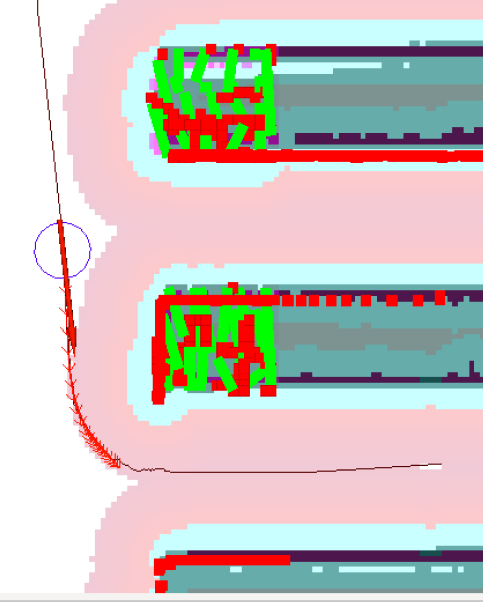
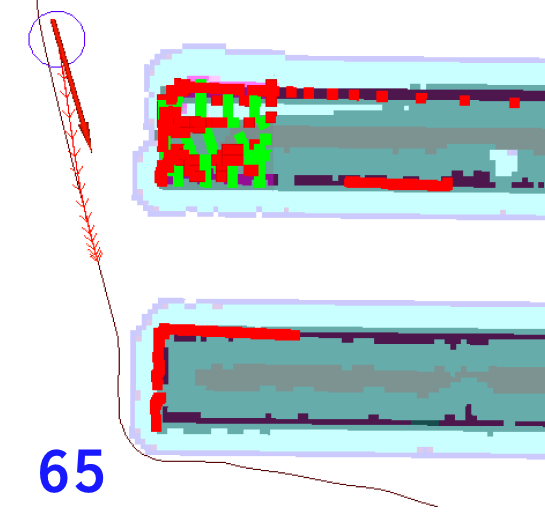
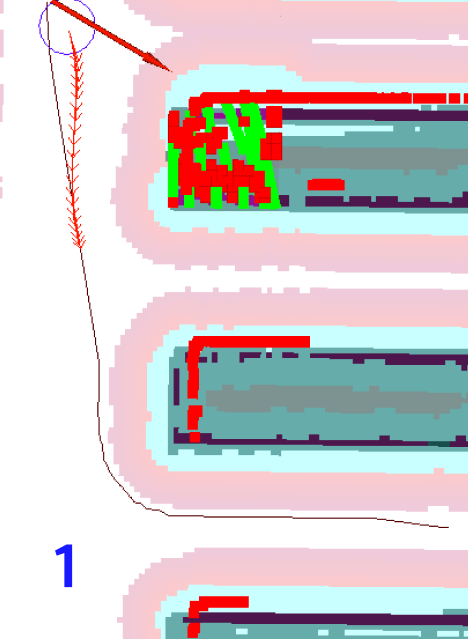
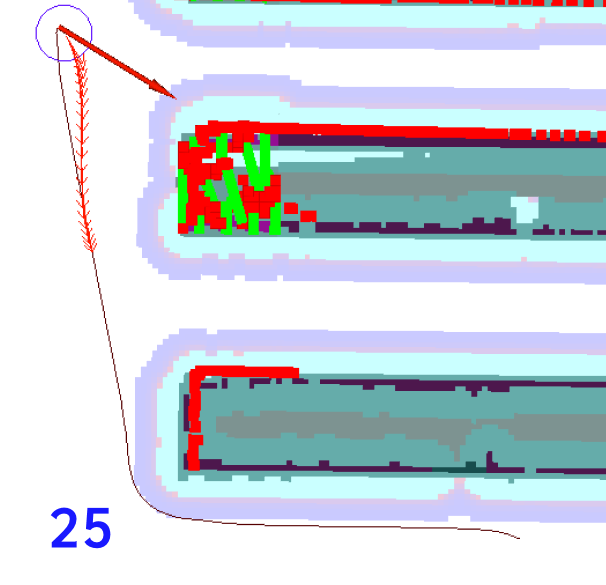
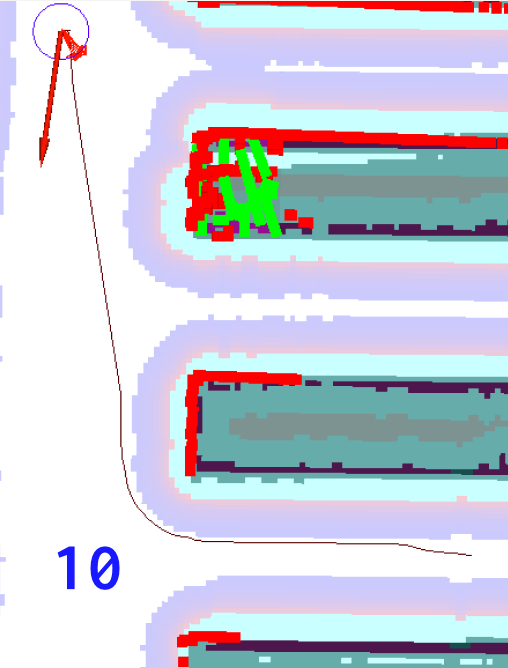
减小cost_scaling_factor,使代价值增大,rviz里的膨胀层变为粉色。如果这个参数很大很大,代价值趋近于0,也就是FREE。如果很小,代价值趋近于253,相当于放大了内切障碍值。cost_scaling_factor越小,膨胀层越趋近粉色,反之趋近蓝色。
查看话题/move_base/local_costmap/costmap_updates,会发现一些数值变大
全局代价地图一般膨胀较多,使机器人转弯顺利。 但是局部代价可以不用膨胀层,这是因为TEB已有障碍物膨胀功能。 增大cost_scaling_factor和减小膨胀半径可以使机器人容易进窄通道,但一般是调整TEB,这两个参数不修改。
添加了静态层、障碍层、膨胀层的代价地图是这样的:
如果代价地图不添加膨胀层,结果是这样:
但是加不加障碍层,看上去没有变化, 目前无法在rviz里直接可视化每一层,只能添加或去除后观察
TF发布的话题一般有两种: tf 和 tf_static
tf是只要有节点发布就会有消息, tf_static是在已知的坐标发生变化或有新的节点订阅的时候才会发布新的消息
录制数据集时一定要录这个话题
tf_static是静态转换, 和tf的格式一样, any transform on this topic can be considered true for all time. Internally any query for a static transform will return true.
tf_static的发布者使用latched topics, the tf2_ros static_transform_publisher does this correctly. Note: avoid multiple latched static transform publishers on /tf_static in the same process, because with multiple latched publishers within the same node only one will latch correctly.
比如这样的,echo只有这一条结果1
2
3
4
5
6
7
8
9
10
11
12
13
14
15
16
17
18
19
20
21
22
23
24
25
26
27
28
29
30
31
32
33
34
35
36
37
38transforms:
-
header:
seq: 0
stamp:
secs: 1652186247
nsecs: 41763935
frame_id: "base_link"
child_frame_id: "move_link"
transform:
translation:
x: 0.0
y: 0.0
z: 0.0
rotation:
x: 0.0
y: 0.0
z: 0.0
w: 1.0
-
header:
seq: 0
stamp:
secs: 1652186247
nsecs: 41846600
frame_id: "base_link"
child_frame_id: "shelf_link"
transform:
translation:
x: 0.0
y: 0.0
z: 0.0
rotation:
x: 0.0
y: 0.0
z: 0.0
w: 1.0
---
当启动ROS程序后,如果想查看存在的所有坐标系转换关系,可以使用命令rosrun tf view_frames,结果会在当前目录生成pdf文件:
顺便说一下,打开pdf的命令为evince frames.pdf
跟上一个命令差不多,区别是直接打开一个pdf文件,但不会保存
在仿真环境下,使用rostopic hz tf,发现tf的频率是40Hz左右,这个数值是各个tf变化叠加的结果,使用rqt_tf_tree可以看到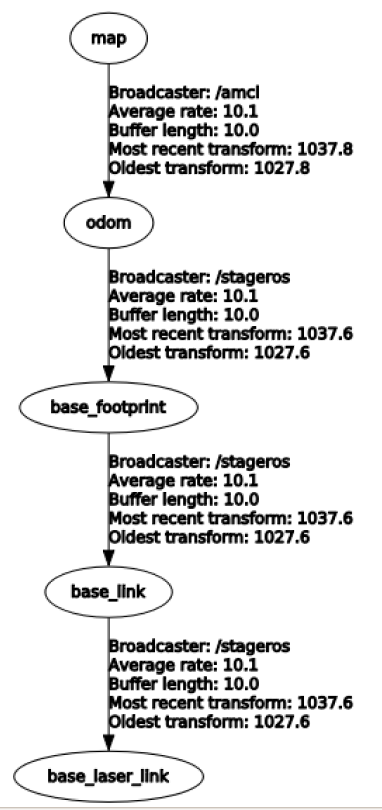
有些转换可能显示average rate有数值,但是buffer 和 recent transform都是0,这种其实没有发生tf,所以不能算数。
左上角还有一个clear buffer按钮,Buffer length会清零Buffer length表示tf buffer中有几秒的数据可使用,rqt_tf_tree中是10秒,view frames大约5秒
本命令用来查看两个坐标系之间的实时转换,需要5秒钟:1
rosrun tf tf_echo /turtle1 /turtle2 //turtle1是parent坐标系, turtle2是child

rosrun rqt_tf_tree rqt_tf_tree显示一个带界面的tf图显示工具,不必等待,然后可以另存为svg,png等格式
结果发现刷新按钮不好用,当tf树改变后,刷新有时没有改变显示,有时工具无法响应了
如果要让两个坐标系建立转换关系,常常在launch文件中添加1
<node args="-0.24 0 0.295 1.571 0 -1.571 /base_link /camera 10" pkg="tf" name="base_link_to_camera" type="static_transform_publisher"/>
这个节点就是以base_link为parent坐标系,向camera转换的欧拉角形式。前三个参数是x,y,z三个方向的位移,之后的三个参数是yaw,pitch,roll,然后是parent坐标系和child坐标系,最后是隔多长时间发送一次变换,一般取100(ms)。另一种形式就是四元数形式,也就是将第4~6参数换为qx,qy,qz,qw。